
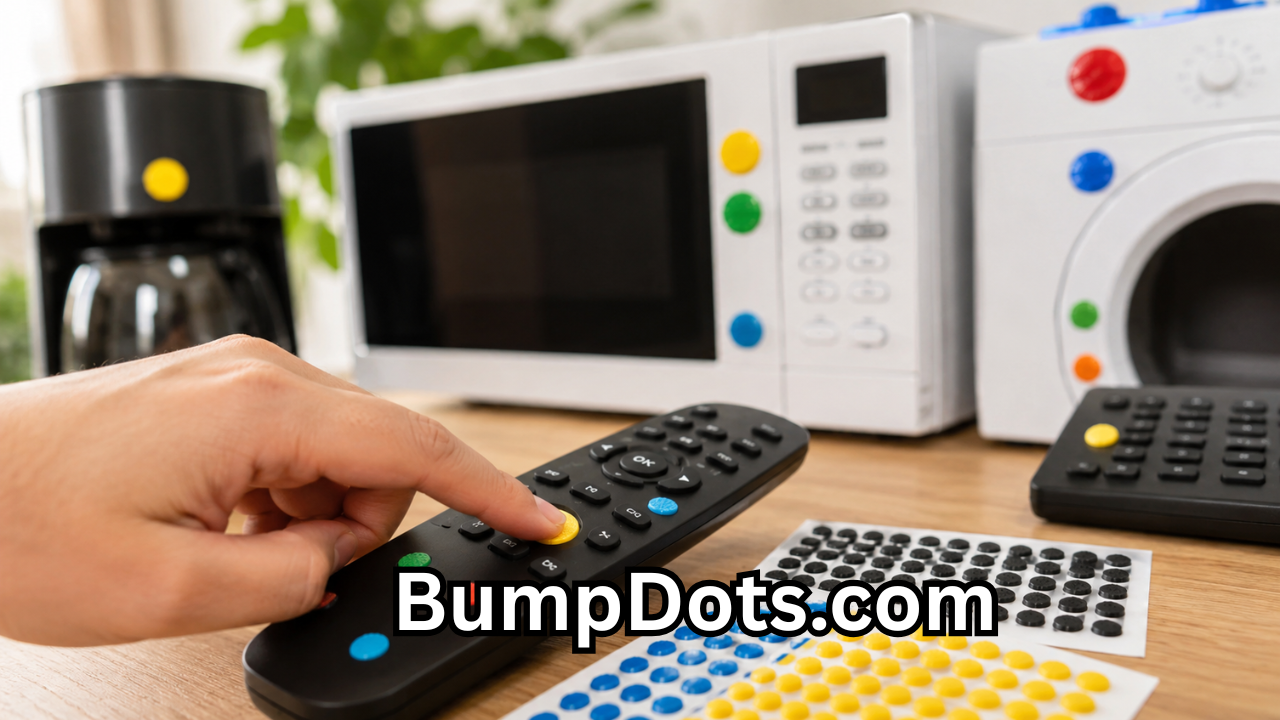
Creating environments that are accessible for everyone is no longer just a legal requirement—it is an essential part of modern design and public safety. As organizations, schools, healthcare facilities, businesses, and homeowners continue to improve accessibility, reliable tactile products have become increasingly important. One name that frequently appears in this field is BumpDots.com, a platform known for offering tactile marking solutions that help individuals with visual impairments navigate everyday environments more confidently.
Whether you are looking to improve workplace accessibility, enhance educational spaces, or make your home easier to navigate, understanding what BumpDots.com offers can help you make informed decisions. This comprehensive guide explores the purpose of tactile markers, their benefits, common applications, and the continued growth in demand for accessibility products across industries.
What Is BumpDots.com?
BumpDots.com is an online platform focused on tactile accessibility products designed to improve navigation, organization, and usability for people with visual impairments and anyone who benefits from tactile guidance.
The website specializes in small raised markers, tactile dots, bump-ons, and accessibility accessories that can be applied to everyday objects. These products help users identify buttons, controls, switches, appliances, keyboards, remote controls, and many other surfaces simply by touch.
As accessibility standards evolve globally, products like these have become valuable tools for promoting independence and creating more inclusive environments.
Why Tactile Accessibility Matters
Millions of people around the world live with partial or complete vision loss. Even simple daily tasks such as adjusting a microwave, using a television remote, operating office equipment, or identifying medication containers can become challenging without tactile indicators.
Tactile markers provide an effective solution because they allow users to:
- Identify controls without visual assistance.
- Improve confidence during daily activities.
- Reduce mistakes when operating devices.
- Increase independence at home and work.
- Support inclusive learning environments.
- Make public spaces more accessible.
Accessibility is not only beneficial for individuals with disabilities. Older adults, children, and anyone using devices in low-light conditions can also benefit from tactile navigation solutions.

Key Features of BumpDots.com
One reason many individuals and organizations explore BumpDots com is the variety of accessibility products available for different situations.
Some common features include:
Durable Materials
Tactile markers are typically manufactured using high-quality materials designed to withstand everyday use without losing their shape.
Strong Adhesive Backing
Most tactile dots feature durable adhesive that allows them to remain securely attached to appliances, electronics, office equipment, and household items.
Multiple Shapes
Different shapes serve different purposes. Round, square, rectangular, and custom designs make it easier to distinguish various controls by touch.
Variety of Sizes
Users can select markers that best fit their equipment, whether marking small electronic buttons or larger industrial controls.
Multiple Colors
While many users rely on touch, high-contrast colors can also assist individuals with low vision.
Common Uses for Tactile Markers
Accessibility products available through BumpDots.com can be used in countless everyday situations.
Home Appliances
Microwaves, ovens, washing machines, dryers, coffee makers, and air conditioners often have multiple buttons that appear similar. Tactile dots allow users to identify important controls instantly.
Television and Media Devices
Remote controls frequently contain dozens of small buttons. Raised markers help users quickly locate power buttons, volume controls, channel selectors, and navigation keys.
Computer Equipment
Many professionals and students use tactile markers on:
- Computer keyboards
- Laptops
- Desktop keyboards
- External keypads
- Monitors
- Computer accessories
This improves typing accuracy and navigation.
Office Equipment
Businesses often apply tactile markers to:
- Printers
- Copiers
- Fax machines
- Telephone systems
- Conference room equipment
- Security access panels
Doing so creates a more inclusive workplace.
Educational Institutions
Schools, colleges, and universities use tactile products to support accessible education.
Markers can be placed on:
- Laboratory equipment
- Classroom technology
- Library resources
- Elevators
- Learning devices
- Assistive technology tools
Students benefit from greater independence throughout the campus.
Healthcare Facilities
Hospitals and clinics often prioritize accessibility by marking:
- Medical equipment
- Patient controls
- Nurse call systems
- Wheelchair controls
- Examination equipment
- Medication storage areas
These improvements contribute to safer patient experiences.
Benefits of Using Accessibility Markers
The popularity of tactile products continues to grow because they offer numerous practical advantages.
Improved Independence
Individuals with vision impairments can operate devices without relying on assistance from others.
Better Safety
Correctly identifying controls reduces the risk of accidents involving electrical appliances, heating devices, and medical equipment.
Increased Productivity
Employees can complete tasks more efficiently when equipment is properly labeled with tactile indicators.
Cost-Effective Accessibility
Compared to replacing equipment with specialized accessible versions, tactile markers provide an affordable accessibility upgrade.
Easy Installation
Most tactile markers require no tools. Users simply peel off the backing and apply the marker to the desired location.
Who Can Benefit from BumpDots.com?
Accessibility products are useful across many industries and personal environments.
Common users include:
- Individuals with blindness
- People with low vision
- Senior citizens
- Rehabilitation centers
- Schools
- Universities
- Government offices
- Healthcare providers
- Libraries
- Hotels
- Corporate offices
- Manufacturing facilities
- Non-profit organizations
- Public transportation providers
These products support universal design principles that benefit a broad audience.
Choosing the Right Tactile Marker
Selecting the appropriate tactile marker depends on the intended application.
Several factors should be considered.
Surface Type
Ensure the adhesive works effectively on plastic, metal, glass, wood, or painted surfaces.
Environmental Conditions
Some applications may require markers that resist moisture, heat, sunlight, or heavy use.
Shape Recognition
Using different shapes helps distinguish multiple functions. For example:
- Round dots for power buttons
- Square markers for volume controls
- Rectangular markers for navigation buttons
This improves recognition through touch.
Marker Height
Raised markers should be easy to detect without interfering with normal device operation.
Accessibility Standards Continue to Expand
Governments and organizations worldwide increasingly recognize the importance of accessibility.
Modern accessibility initiatives encourage businesses to create environments that support people of all abilities. While tactile markers represent just one part of accessibility planning, they often provide immediate improvements with minimal cost.
Many organizations now include accessibility considerations during renovations, equipment purchases, employee training, and customer service planning.
Practical Tips for Installing Tactile Markers
Proper installation helps maximize durability and effectiveness.
Before applying tactile markers:
- Clean the surface thoroughly.
- Remove grease or dust.
- Allow the surface to dry completely.
- Position the marker carefully before pressing firmly.
- Wait several hours before heavy use if recommended.
These simple steps help ensure long-lasting adhesion.
Why Businesses Invest in Accessibility
Accessibility is more than compliance—it reflects a commitment to serving diverse communities.
Organizations that invest in accessible environments often experience benefits such as:
- Better customer experiences
- Increased employee satisfaction
- Stronger public reputation
- Improved inclusivity
- Enhanced workplace productivity
- Greater confidence among visitors
Small improvements, including tactile markers, can make a significant difference for individuals who rely on touch to navigate daily tasks.

Future Trends in Accessibility Products
Technology continues to reshape accessibility solutions.
Future innovations may include:
- Smart tactile navigation systems
- Connected assistive devices
- Interactive accessibility technologies
- Enhanced adhesive materials
- Eco-friendly manufacturing
- Customized tactile labeling solutions
- Integration with voice assistants
- Improved universal design standards
As awareness grows, demand for accessible products is expected to continue increasing across residential, educational, healthcare, and commercial environments.
Tips for Making Any Space More Accessible
Accessibility improvements do not always require major renovations.
Simple steps include:
- Label important controls with tactile markers.
- Improve lighting for individuals with low vision.
- Keep walkways free from obstacles.
- Use consistent room layouts.
- Install high-contrast signage where appropriate.
- Ensure frequently used equipment remains accessible.
- Regularly inspect accessibility features for maintenance.
These small adjustments contribute to safer, more inclusive environments.
Conclusion
BumpDots.com has become a recognized destination for tactile accessibility products that help individuals navigate everyday life with greater confidence and independence. From homes and schools to hospitals, offices, and public facilities, tactile markers provide practical solutions that improve safety, usability, and accessibility without requiring expensive equipment replacements.
Also Read: ThomsonKids.com: A Complete Guide to Safe, Fun, and Educational Learning for Children








Leave a Reply